
The GSD Method: How to Actually Get Stuff Done with AI Workflows
The GSD (Get Stuff Done) approach to AI workflows has exploded in popularity, with community repos pulling 25,000+ stars on GitHub. That’s because it solves the actual problem most power users face: not “how do I use AI” but “how do I stop drowning in AI-generated output that goes nowhere.”
Most people using Claude Code, Copilot, or any AI coding tool are doing what the community calls “vibe coding.” They prompt, they get output, they prompt again. No system. No process. No way to track what’s done, what’s in progress, or what fell through the cracks. GSD fixes that.
We’ve been running a variant of the GSD approach (we call it GSDF, for GSD Funnel) for weeks in a production environment. Here’s what actually works, what we changed, and how to build your own system.
The GSD Philosophy
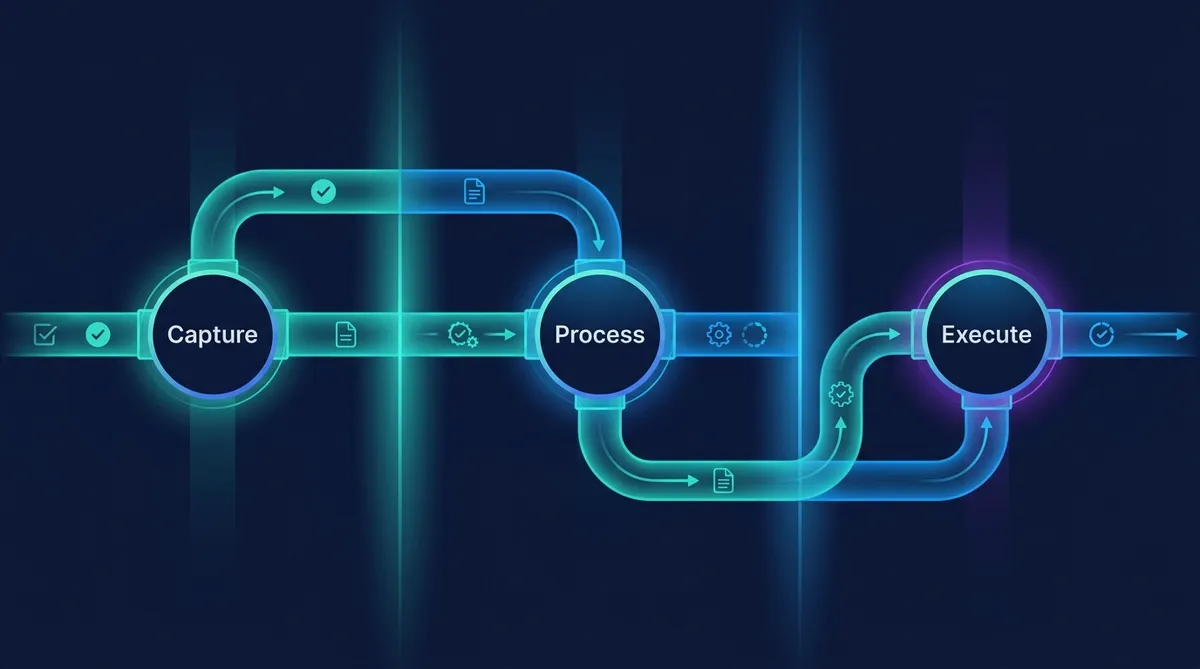
GSD boils down to three phases: Capture, Process, Execute. That’s it. Everything else is implementation detail.
Capture means accepting every input without judgment. Ideas, tasks, bugs, feature requests, random thoughts at 2am. The goal is zero friction on input. If it costs effort to record something, you won’t record it, and it’ll either nag at your brain or disappear entirely.
Process means taking those raw inputs and turning them into actionable items. What is this? Who does it? When does it need to happen? Is it even worth doing? This is where most people fail with AI workflows. They capture plenty (Claude generates tons of ideas and follow-up tasks) but never process them into something executable.
Execute means doing the work in priority order, with clear definitions of done. Not starting five things at once. Not jumping to the newest, shiniest task. Working the queue.
The Core Principle
Where Most AI Workflows Break Down
If you’re using AI tools daily, you’ve probably noticed the same pattern we did: AI is great at generating work but terrible at managing it.
A single Claude Code session might produce a working feature, spawn three bug reports, surface two refactoring opportunities, and suggest a new approach to an adjacent problem. Without a system, those outputs scatter. The feature ships, but the bugs go into a mental backlog that decays by the hour.
The failure modes are predictable:
No capture system. AI outputs are ephemeral. We wrote five articles in one session and each spawned 3-4 follow-up ideas. Without a capture system, that’s 15-20 ideas gone by the next morning. If it’s not in a file, it doesn’t exist.
Processing paralysis. You capture everything but never decide what to do with it. Your backlog hits 190 items (we’ve been there) and becomes psychologically impossible to face. The fix isn’t capturing less; it’s processing more aggressively.
Execution without prioritization. You work on whatever feels urgent or interesting, not whatever actually matters. The new tool to try always beats the documentation that needs writing.
GSD addresses all three. GSDF takes it further.
GSDF: The Funnel Variant
Standard GSD assumes you’re a single person with a single tool. Our setup is different: multiple AI agents, multiple execution surfaces (Claude Code on a server, Cowork on desktop, Claude Chat for strategy), and a shared task board that everything funnels into.
GSDF adds two concepts on top of GSD:
The Funnel
Every input, regardless of where it originates, gets funneled to one place. Phone captures go to Google Tasks (fastest on mobile). Voice notes get transcribed and dropped in. AI session outputs get extracted and filed. Physical sticky notes get photographed. The point is that the capture tool adapts to the context, but the destination is always the same.
GSDF Input Types We Track
1. AI session spawns (Claude Code, Cowork, Chat)
2. Manual task captures (Google Tasks, sticky notes)
3. Email action items (Gmail flagged items)
4. Content ideas (from research, browsing, conversations)
5. Bug reports (from testing, user feedback)
6. Process improvements (friction points, workflow gaps)
7. Infrastructure tasks (server, deployment, monitoring)
8. Personal tasks (family, errands, appointments)
9. Learning items (courses, docs, articles to read)
10. Financial tasks (invoices, subscriptions, budget items)
11. Communication tasks (emails to send, messages to write)
12. Creative ideas (designs, art, side projects)
13. Someday/Maybe items (no timeline, worth remembering)
The Filter
A funnel without a filter is just a firehose. The processing step in GSDF is aggressive. Every captured item gets one of four treatments:
- Do it now (under 5 minutes? Just knock it out.)
- Route it (server work goes to Mission Control; content goes to the content pipeline; personal tasks go to the personal board)
- Schedule it (needs to happen, but not now; gets a date and goes to the backlog)
- Drop it (doesn’t pass the filter; archived with a one-line note on why)
The filter question is simple: “Does this move a current goal forward?” If yes, route it. If no, it’s Someday/Maybe or it’s trash.
The Quick Win Rule
Building This With AI Tools
Here’s where it gets practical. A GSD/GSDF system with AI involves three layers:
Layer 1: Capture Automation
Set up your AI tools to automatically extract and record follow-up items. In Claude Code, this means using a CLAUDE.md file or memory system that persists across sessions. In Cowork, it means a TASKS.md board that the assistant actively manages.
CLAUDE.md Task Capture Pattern
## Active Tasks
- [ ] Task description (source: session/manual, priority: high/med/low)

## Spawned Items (process at session end)
- Idea or follow-up from today's work

## Done
- [x] Completed task (date, outcome)
The key is that your AI assistant doesn’t just do work. It records work. Every session should end with a clean handoff: what was done, what was spawned, what needs attention.
Layer 2: Processing Workflow
Schedule a processing pass at least once per day. This is where you (or your AI assistant) go through captured items and apply the four treatments. Be ruthless. An overflowing backlog is worse than an empty one because it creates the illusion of productivity without the reality of progress.
For multi-agent setups, processing includes routing: which agent or tool handles this? Server infrastructure goes to your server-side agents. Content work goes to your content pipeline. Personal tasks stay on your personal board. The routing decision happens once, during processing, not repeatedly every time you look at the item.
Layer 3: Execution Discipline
This is the hardest part, and AI can’t do it for you. Execution discipline means working the queue in priority order. It means finishing what you started before starting something new. It means identifying passive tasks (builds running, deploys processing, research queries executing) and kicking them off first so they run in parallel while you focus on active work.
Daily Execution Pattern
1. Start passive work first (builds, deploys, long-running tasks)
2. Process the inbox (capture > route > schedule > drop)
3. Clear quick wins (under 5 min each)
4. Work the top priority from the Active column
5. End-of-session: update board, capture spawns, clean up
Think like a pipeline. Start the slow background work, then fill the wait time with hands-on tasks. Never sequence passive-then-active when they can overlap.
Active vs. Passive: The Overlooked Optimization
Most productivity systems treat all tasks the same. GSD doesn’t distinguish between a task that needs your full attention for an hour and a task that runs in the background for an hour while you do other things.
GSDF separates them explicitly. Before starting any work block, scan your queue for passive tasks: code builds, API requests, file processing, research queries, data exports. Kick those off first. Then switch to your active task while the passive work completes.
This sounds obvious, but it’s the single biggest time multiplier we’ve found. A 4-hour work block with good active/passive interleaving can accomplish 6+ hours of sequential work.
When GSD Fails (and What to Do)
GSD breaks down when the system itself becomes work. If you’re spending more time managing tasks than doing tasks, you’ve over-engineered it. Scale the system to match your actual throughput.
It also fails when you ignore the processing step. Capture without processing is hoarding. Your backlog will grow until it’s psychologically overwhelming, and then you’ll abandon the whole thing.
The fix is the same in both cases: simplify. One capture tool. One board. One processing pass per day. One priority at a time. We started with a complex multi-board system, simplified to a single TASKS.md with five sections (IDEAS, Active, Blocked, Someday, Done), and our throughput doubled. Everything else is optimization you can add later.
Start Your GSD System Today
Pick one capture tool you already use. Set a daily 10-minute processing alarm. Create three columns: To Process, Active, Done. That's your whole system for week one.
Share this article
If this helped, pass it along.